| Outlook Express |
|
STEP 10:
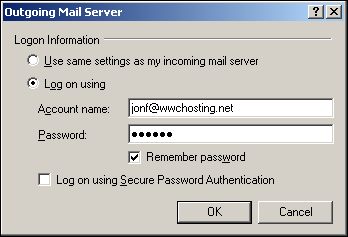
In the "Outgoing Mail Server" dialog for you will finalize your email account setup by clicking the radio button labeled, "Log on using" and entering your email address and password in the text boxes below. If you don't want to have to enter your password each time you send mail then click the "Remember password" checkbox.
Your Outlook Express email client software is now setup. Click "OK" on all open dialog boxes until you return to Outlook Express.
You are now ready to send and recieve email from your World Wide Communications email account.


|
|
|

